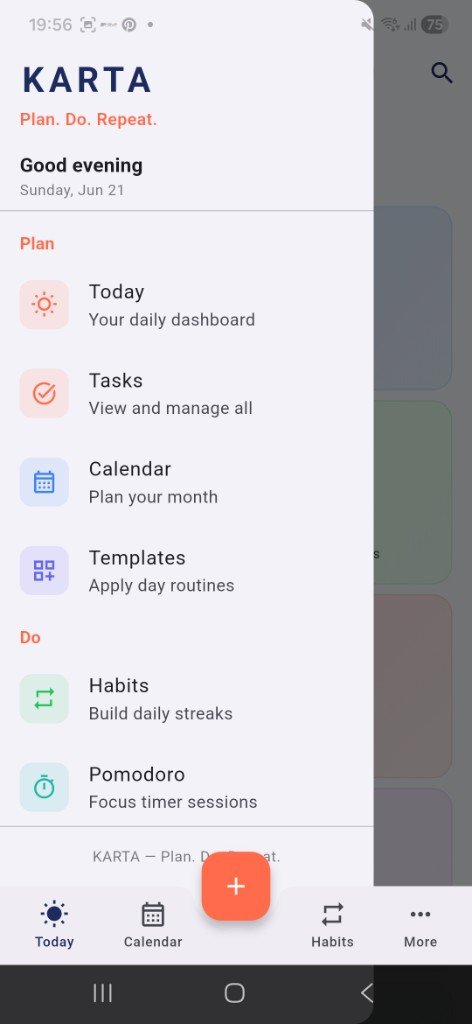
Plan
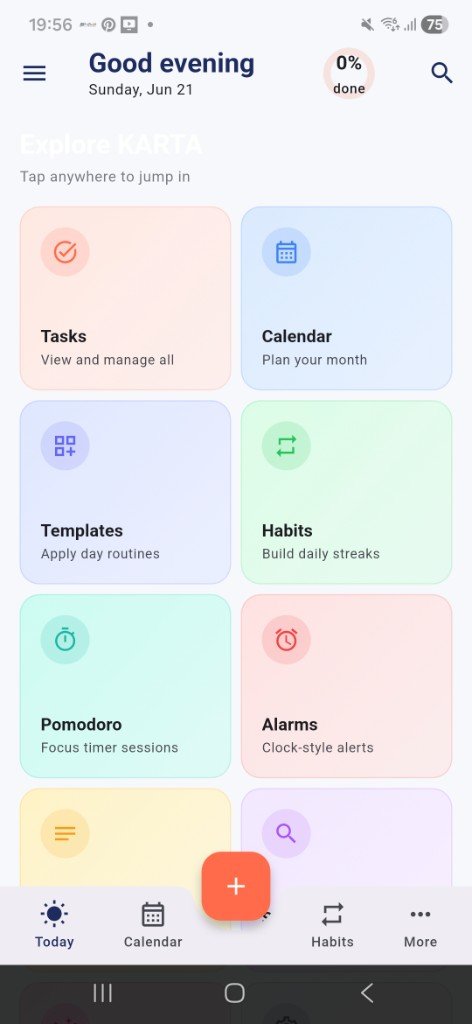
- Today — dashboard with week strip, next task, and progress
- Tasks — priorities, due dates and times, tags, swipe-to-complete
- Calendar — month and week views with day detail and agenda
- Templates — reusable day routines you can apply in one tap

Free · Offline-first · Android · No sign-up
KARTA — Plan. Do. Repeat.
AI Strategist | Predictive Astrological Intelligence | Full Stack Developer | Business & Finance Decision Architect
KARTA is a free offline-first daily planner for Android — tasks, habits, notes, calendar, and Pomodoro focus sessions. Your data stays on your device — no account, no cloud sync required — by Sharad Khare.
Plan. Do. Repeat.
Official builds are published on GitHub Releases. Download only from the links below — not third-party mirrors.
KARTA v1.0.0 for Android 7.0+ (API 24+). Download the APK from GitHub Releases and install on your device. Includes a home screen widget for Today progress and your next task.
App: KARTA · OS: Android 7.0+ · Price: Free (₹0)
Jump to downloads, features, screenshots, and FAQ in one tap.
Plan tasks and habits, focus with Pomodoro, reflect in notes — all offline.
KARTA is a free offline-first daily planner and productivity app for Android. Plan your day with tasks, habits, notes, and calendar views; stay focused with a Pomodoro timer; and keep everything on your device with local backup — no account or cloud sync required.
Whether you are managing a busy workday, building daily habits, or tracking focus sessions, KARTA keeps your planner private and portable — with backup files you control.
Plan your day, stay focused, and review your week — without signing up.
Explore dashboard and Plan / Do navigation from the Android app.
Answers about offline use on Android, downloading from GitHub Releases, tasks, habits, Pomodoro, and local backup.
KARTA is a free offline-first daily planner and productivity app for Android. It combines tasks, habits, notes, calendar, and a Pomodoro focus timer in one app — Plan. Do. Repeat. — with no sign-up required.
Yes. KARTA is built offline-first. Your tasks, habits, notes, and focus sessions stay on your device and work without an internet connection. There is no mandatory cloud sync or account.
KARTA is available for Android. Official APK builds are published on GitHub Releases and linked from sharadkhare.in/product/karta/.
Download the latest KARTA APK from GitHub Releases via the official link on sharadkhare.in/product/karta/. Install on Android 7.0 or later.
KARTA tasks support priorities, due dates and times, tags, and swipe-to-complete. Habits include daily check-ins with streak tracking. The Today dashboard shows your week strip, next task, and progress at a glance.
Yes. KARTA includes a Pomodoro focus and break timer with session logging so you can track focused work alongside your daily plan.
Open More → Settings in KARTA, then tap Export backup to save all your data as JSON, or Import backup to restore. Backups stay in files you control — useful when moving devices or keeping a local archive.
Yes. KARTA includes an Android widget that shows Today progress and your next task on the home screen.
Yes. KARTA v1.0.0 is free to download and use on Android. Official builds are published on GitHub Releases and linked from sharadkhare.in/product/karta/.
KARTA is built by Sharad Khare — the same developer behind Samaya (Vedic astrology app), Yonah (interactive coding platform), and Setum (LAN file sharing). Learn more at sharadkhare.in.
AI Strategist | Predictive Astrological Intelligence | Full Stack Developer | Business & Finance Decision Architect
Sharad Khare is the creator of KARTA, alongside Samaya (Vedic astrology), Yonah (interactive coding platform), and Setum (LAN file sharing).
Questions or feedback? Reach out via the links above.
KARTA stores your tasks, habits, notes, and focus data on your device. It does not require an account and does not upload your planner data to a central cloud server. Use Export backup in Settings to keep archives you control, and download official builds from GitHub Releases linked on this page.
KARTA · Offline Daily Planner · by Sharad Khare